Couples
One of you does mornings, the other does evenings. Both of you know Bella’s had her tablet.
The app is built. Coming soon to the App Store and Google Play.Join the waitlist
Care Team
Care Team puts your pet’s day on everyone’s phone. Invite your partner, family or sitter, tick things off together, and see who did what.


Tick something off and it updates for the whole team in seconds.
See who walked, fed or medicated, without asking.
Tap the bell on a task to send one person a gentle reminder.
Caregivers help. Viewers watch. Only the owner invites or removes.
Who it’s for
Most pets have more than one person looking after them. Now they share one routine.
One of you does mornings, the other does evenings. Both of you know Bella’s had her tablet.
The kids tick off the walk. Everyone sees dinner’s done. Nobody feeds the dog twice.
A shared cat, a shared checklist. No more notes on the fridge.
Invite them as a caregiver for the week. They see the routine; you see every walk logged.
Pets split between two homes keep one history: meds, weight and vet records in one place.
Hand over to a friend with everything they need, and follow along from wherever you are.
How it works
On Home, tap Manage next to Care Team, then Invite. Search for them by username or email.
Caregiver to help with care, or Viewer to follow along. They accept from their notifications.
Everyone sees the same checklist, records and reminders, with who did what.
Roles
The owner decides who’s on the team and what they can do.
| Permission | Owner | Caregiver | Viewer |
|---|---|---|---|
| See today’s care, reminders and records | Yes | Yes | Yes |
| Tick off tasks and log meals, water, walks and potty breaks | Yes | Yes | No |
| Add reminders and health records | Yes | Yes | No |
| Get reminders from the team | Yes | Yes | Yes |
| Invite, cancel or remove people | Yes | No | No |
Reminders from the team
Running late? Tap the bell next to any task and choose who to remind. They get one push notification, like “Sarah reminded you to give Bella medication.” No chasing, no long threads.


What’s shared
Everything on Home is shared with the team, so the vet visit your partner booked is on your phone too.
In the app
Start from the Home tab and tap through. Dark numbers open the next screen.
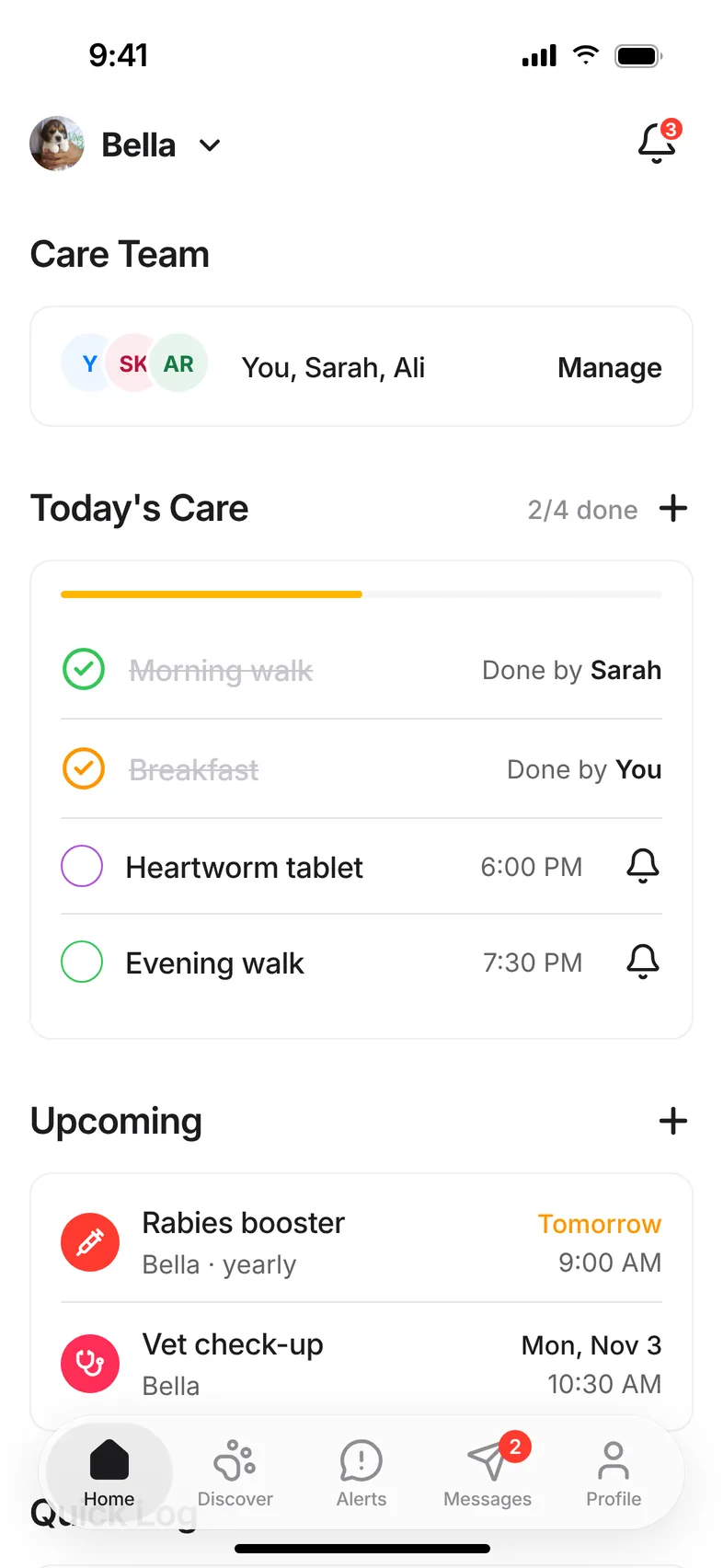
Screen 1 of 7
Care Team lives on the Home tab. Everyone on the team sees this same screen for the pet.
Every step, explained.
Read the full step-by-step guidePrivacy
Nobody joins a care team without an invite from the owner, and an accept from them.
The owner can remove a member or cancel a pending invite in two taps.
Each pet has its own team. Your sitter sees the dog, not the rest of your life.
Yes. Care Team is part of Hushku, which is free with no subscription. There’s no extra charge for adding people.
Yes. Each person needs a free Hushku account so their phone stays in sync. You invite them by username or email.
Caregivers can help manage the pet’s care: tick things off, log care and add records. Viewers can see everything but can’t change it.
Yes. The owner can remove any member or cancel a pending invite at any time from the Care Team screen.
Tap the bell next to any task on Home and choose who to remind. They get a push notification like “Sarah reminded you to give Bella medication.”
Yes. Each pet has its own care team, so your sitter can help with the dog without seeing the cat. Switch pets at the top of Home.
Yes. Care reminders and care team notifications each have their own switch in Settings.
The full guide, with every screen.
Reminders, weight, records, flea and tick and heat cycles.
What a sitter or walker costs near you.
Get the app
Playdates, adoption, lost and found alerts and your pet's care all live in Hushku for iPhone and Android. The app is built and on its way to the stores.
Got a soft spot for animals? Volunteer with us

